Both approaches solve the same frustration: editing a Shopify catalog one product at a time is unbearable past about fifty SKUs. Where they part company is what you actually touch — a file you export, edit and upload back, or a spreadsheet that stays connected to the store.
This page compares the two workflows honestly, including the cases where a file-based tool like Matrixify is the better answer. We build SheetSync, so treat the recommendation as interested — but every claim below is drawn from published documentation, linked at the end.
The short version
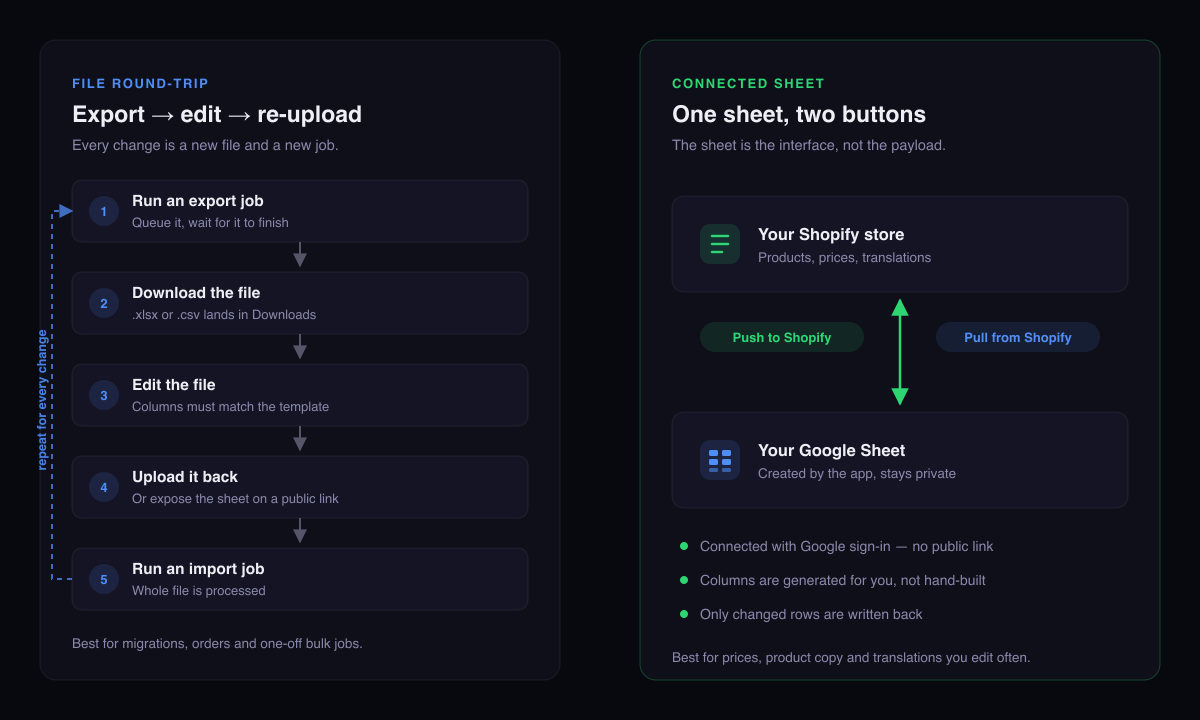
Choose by edit frequency, not by feature count
If your catalog work is occasional and wide — a migration, a bulk order export, a one-time restructure across many data types — a file round-trip is the right shape, and Matrixify is very good at it.
If your catalog work is frequent and narrow — prices that move weekly, product copy, translations kept in step across locales — the round-trip becomes the bottleneck, because every change means a fresh export, a fresh file and a fresh import job.
Workflow 1: the file round-trip
Matrixify is built around human-readable Excel and CSV files. The loop is: run an export job, wait, download the file, edit it, upload it back, run an import job. It covers an unusually broad surface of Shopify — products, collections, customers, orders, draft orders, discounts, payouts, pages, blogs, redirects, files, metaobjects, metafields, navigation menus, store credits and translations — and it handles very large files.
That breadth is the point. If you are migrating a store, or need orders and customers out alongside products, no connected-sheet tool comes close.
The cost is that the file is the unit of work. Nothing persists between edits: the file you downloaded on Tuesday is stale by Thursday, and there is no built-in notion of "what changed since last time" — you are shipping a document, not reconciling a state.
Matrixify does support Google Sheets — with conditions
This is where most comparisons get lazy, so to be precise: Matrixify can read a Google Sheet. A scheduled import points at a sheet URL and re-downloads it on a timer. But the mechanics matter:
- The sheet must be shared as "Anyone with the link can view", and the "viewers can download, print and copy" option must stay enabled or Google returns an error.
- You build the sheet yourself, matching the template's tab names and column headers.
- Going the other way, exports are not written into your sheet. Matrixify produces a file URL and the sheet pulls it with an =IMPORTDATA() formula — which Google refreshes roughly hourly, with a documented ceiling of 50 IMPORTDATA calls per spreadsheet.
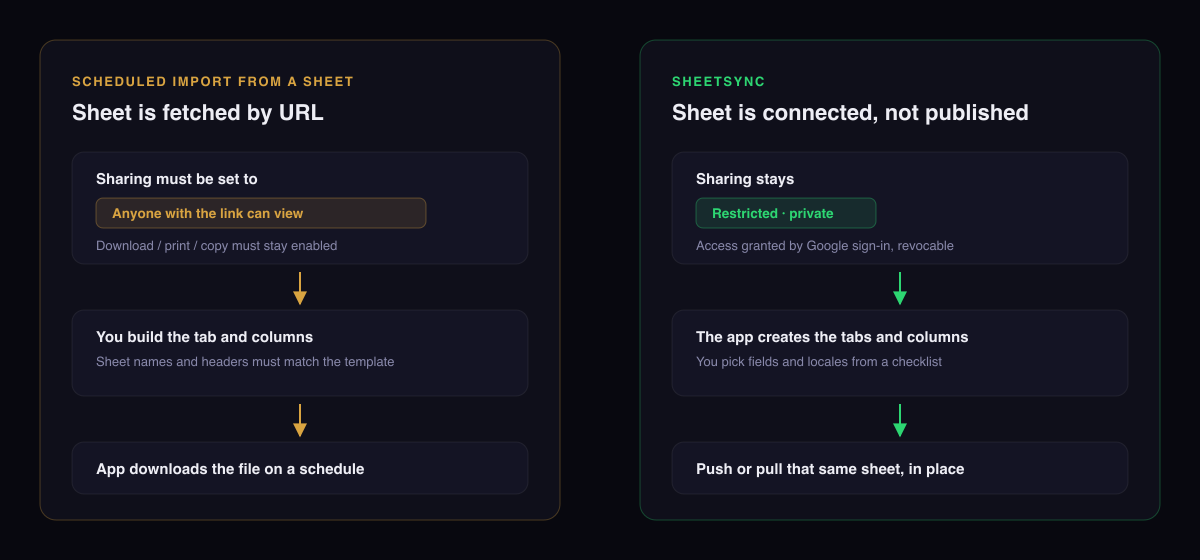
For a lot of stores that is perfectly fine. For anyone whose price list is commercially sensitive, "anyone with the link can view" is a conversation with the person who owns risk at your company.
Workflow 2: the connected sheet
The other model inverts the relationship. Instead of the sheet being a file format the tool happens to read, the sheet is the interface:
- The app creates the spreadsheet for you, with the tabs and columns already correct for the fields and locales you ticked.
- It connects through Google sign-in, so the sheet stays Restricted and you can revoke access from your Google account at any time.
- You keep the same sheet. Push to Shopify sends your edits; Pull from Shopify refreshes it with the store's current data.
- Only rows that genuinely differ are written back, so a push after a push does nothing rather than rewriting your whole catalog.
The trade is scope. SheetSync deliberately covers products, pricing across Shopify Markets, translations, metafields, tags, theme template, product status, HS codes and country of origin — not orders, not customers, not migrations.
Side by side
| File round-trip (Matrixify) | Connected sheet (SheetSync) | |
|---|---|---|
| Unit of work | A file you export and upload | A sheet you keep and reuse |
| Getting data out | Export job → download, or an IMPORTDATA formula refreshed hourly | Pull rewrites the sheet you already have |
| Getting data in | Upload the file, or schedule a fetch from a link | Push, from the same sheet |
| Sheet sharing | Public link required for scheduled imports | Stays private; Google sign-in, revocable |
| Building the sheet | You match the template's tabs and headers | Generated from a field and locale picker |
| Unchanged rows | File is processed as submitted | Skipped — only differences are sent |
| Data covered | Almost everything, including orders, customers and migrations | Products, pricing, translations, metafields |
| Migrating from another platform | Purpose-built for it | Not supported |
| Free tier | Yes, with small per-file limits | 7-day trial, no free tier |
| Paid entry price | From $20/mo, to $200/mo unlimited | From $9.99/mo, to $49.99/mo unlimited |
Prices and limits as published in September 2026; check both listings before deciding, since plans change.
Which one should you pick?
Pick a file round-trip if…
- You are migrating a store onto or off Shopify
- You need orders, customers, payouts or draft orders
- Your bulk edits are occasional and large
- You want one tool covering every data type
- You are comfortable maintaining template files
Pick a connected sheet if…
- Prices or product copy change every week
- You sell across several Shopify Markets
- You maintain translations in more than one locale
- Your sheet must stay private, not link-shared
- You want the same sheet to still be there tomorrow
They are not mutually exclusive
Plenty of stores run both: a file-based tool for migrations and order exports, a connected sheet for the catalog edits that happen constantly. The only rule is not to point both at the same fields at the same moment — whichever writes last wins.
What the connected-sheet workflow looks like in practice
Two walkthroughs with screenshots, if you want to see the loop rather than read about it:
- Bulk update Shopify pricing using Google Sheets — market-by-market price edits in about two minutes.
- Bulk translate Shopify products using Google Sheets — one tab per locale, translations pushed in a single run.
Frequently asked questions
Does Matrixify work with Google Sheets?
Yes. It can run a scheduled import from a Google Sheet, and its exports can be pulled into a sheet. The import needs the sheet shared as "Anyone with the link can view" and laid out to match the Matrixify template. Exports are not written into the sheet directly — Matrixify produces a file URL that the sheet fetches with an IMPORTDATA formula.
What is the main difference between Matrixify and SheetSync?
Matrixify is a bulk import and export tool built around files, covering almost every Shopify entity including orders, customers and migrations. SheetSync is narrower — products, pricing, translations and metafields — but the Google Sheet is the interface: the app creates it, it stays private to your Google account, and you push or pull that same sheet in place.
Do I have to make my Google Sheet public to use it with Shopify?
It depends on the tool. A scheduled Matrixify import fetches the sheet over a link, so the sheet must be shared as "Anyone with the link can view" with download and copy left enabled. SheetSync connects through Google sign-in instead, so the sheet stays restricted and access can be revoked from your Google account.
Which is better for bulk price changes across Shopify Markets?
If you change prices often, a connected sheet is usually less work: the sheet already carries one price column per market, you type the new numbers, and only the rows that actually changed get written back. A file round-trip is a better fit when the price change is a one-off, or when it accompanies a migration or a bulk job across other data types.
Can I use both on the same store?
Yes, and many stores do. Keep a file-based tool for migrations, orders and customer exports, and use a connected sheet for day-to-day catalog edits. Just avoid running both against the same fields at the same moment.
See the connected-sheet workflow yourself
Connect Google, generate a sheet, edit it, push it back. Seven-day free trial, no credit card.
Try SheetSync freeSources for the Matrixify behaviour described above, all publisher documentation: Schedule import to Shopify from Google Sheets, Scheduled exports from Shopify to Google Sheets, Matrixify documentation, and the Matrixify Shopify App Store listing for plans and limits. Matrixify is a trademark of its respective owner and is not affiliated with SheetSync. Details were accurate in September 2026 and may have changed since.